
Inspiration and Background
Whenever you see “Arabic” as a language option on a website, in subtitles, or in a translation tool, it’s almost always referring to Modern Standard Arabic (MSA). While many Arabic speakers can understand MSA, it’s rarely spoken in everyday conversations. For foreigners relying on a generic “Arabic” translator, this can lead to deep confusion when faced with the vast differences between regional dialects. If you try using an “Arabic” translator in Morocco, Iraq, Oman, or Algeria, you’ll quickly realize just how lost you can get.
Earlier this year, my grandmother was diagnosed with Alzheimer’s. She had been an English professor her entire professional life, so I assumed she’d continue communicating in English as her condition progressed. But when I became her primary caretaker, she started speaking to me in Egyptian Arabic, often misrecognizing me as someone else. I never learned Arabic as a child, and at times, our conversations became frustrating for both of us.
I needed a reliable translator that could handle the Egyptian dialect. After trying several well-known options - Google, Bing, iTranslate, DeepL, and others - I found that none could accurately interpret what she was saying. The translations were either nonsensical or entirely off the mark. If there wasn’t already a tool out there for our specific needs, I decided to build my own.
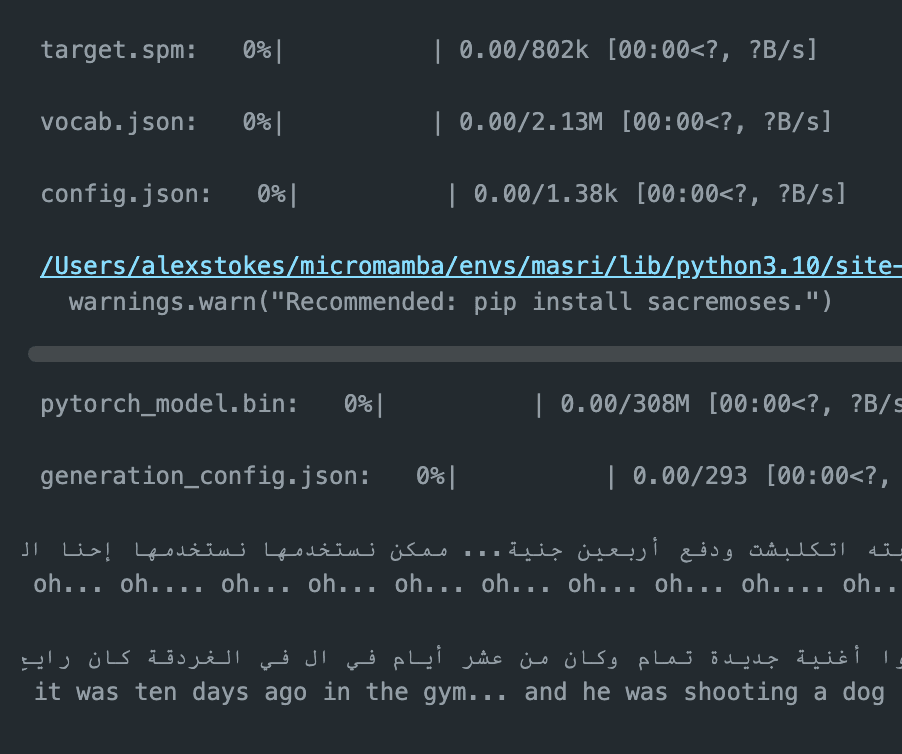 Even state of the art models trained on traditional arabic fall on their face when fed Egyptian Arabic as input.
"...it was ten days ago in the gym... and he was shooting a dog"
Plan of Action
As mentioned earlier, there isn’t much overlap between Egyptian Arabic and Modern Standard Arabic - but that doesn’t mean there’s no overlap. A reasonable approach would be to fine-tune a pre-trained LLM or sequence-to-sequence (seq2seq) model using a moderately sized, exclusively Egyptian Arabic → English dataset. While such datasets do exist, it won’t come as a surprise that their quality - both in terms of recordings and translations - can be questionable. Unlike widely spoken languages like Spanish, dialectal Arabic lacks massive, high-quality corpus-scale datasets.
Moreover, depending on the data available, we could be needing one OR two models (called stacking in this case). Recognition: from audio to written arabic, and translation: from text to text. Each approach - using a single model versus two separate models - comes with its own advantages and trade-offs, which I’ve outlined below:
One Voice-To-Text Model
| Pros | Cons |
|---|---|
| Simpler model | Requires Large, ACCURATE dataset |
| Fewer parameters, easier to train | Data must include disfluencies and slang |
| Faster inference | Harder to benchmark |
| Less expensive to deploy | Difficulties in knowing source of failures. (Transcription or translation?) |
Separate Recognition & Translation Models
| Pros | Cons |
|---|---|
| More flexible with dataset requirements, easier sourcing | Multiple model architectures |
| Modularity allows for easier improvements, tracking, and benchmarking | Slower inference |
| More pre-existing PT models to fine-tune | More expensive to deploy |
| Compatible with RAG and/or fine-tuning for other dialects | Overall accuracy still depends on weakest sub-model |
Fortunately (or unfortunately, we'll see...), the decision was made for us. After searching extensively, I couldn’t find a single dataset that included both audio and translated text. Given the need for urgency and the time it would take to wrangle and format a new custom dataset, the clear winner was: a two-model stacked architecture!
The Data we Do Have
I found several reliable datasets that had the potential to facilitate successful models; two for recognition and one for translation.
Recognition:
- abuelnasr/eg_conversational_speech (Train: 3.08k rows, Test: 163 rows)
- severo/Egyptian-ASR-MGB-3 (Train: 1.16k rows, Test: N/A)
Translation:
- ahmedsamirio/oasst2-9k-translation (Train: 9.45k rows, Test: N/A)
- hlillemark/mt5-3B-flores200-packed (Train: 41.3M total rows)
For recognition, the two datasets had no overlap and were able to be interleaved together with the following:
import datasets
from datasets import interleave_datasets, Audio, Value

# Create aggregate audio datasets
audio_masri_dataset = datasets.load_dataset("abuelnasr/eg_conversational_speech")
mgb3_dataset = datasets.load_dataset("severo/Egyptian-ASR-MGB-3")
keys = ["audio", "transcript"]

audio_masri_dataset = audio_masri_dataset.select_columns(keys)
audio_masri_dataset = audio_masri_dataset.cast_column(
    "audio", Audio(sampling_rate=16000)
)
audio_masri_dataset = audio_masri_dataset.cast_column(
    "transcript", Value(dtype="string", id=None)
)

mgb3_dataset = mgb3_dataset.cast_column("audio", Audio(sampling_rate=16000))
mgb3_dataset = mgb3_dataset.rename_column("sentence", "transcript")

audio_dataset = interleave_datasets(
    [audio_masri_dataset["train"], mgb3_dataset["train"]],
    stopping_strategy="all_exhausted",
)
print(audio_dataset["train"].features)
Quality Assurance in Data
In the case of recognition tasks, evaluation is straightforward - there is typically only one correct transcription for a given spoken sentence. However, translation introduces a degree of subjectivity, which can affect both the model’s loss function and its real-world usefulness. **As a bit of foreshadowing, the OASST2 dataset was found to contain some controversial/inaccurate interpretations. Fortunately, I had a few friends and family members who helped validate and refine the problematic records.
Models & Training
Before even considering model architecture or how to approach this problem, we first need to determine whether fine-tuning is the right strategy. Specifically, I wanted to explore whether a strong foundational translation model for Traditional Arabic could be effectively fine-tuned for the Egyptian dialect. Was there nough linguistic overlap?
Since most modern translation models rely on transformers, which have a groundbreaking ability to understand context and grammar, fine-tuning on a dialect with not just vocabulary differences but also grammatical variations could be counterproductive, inefficient, or even degrade accuracy. Without deep familiarity with these languages myself, the best way to answer this question was to run the pretraining process and benchmark the results. If fine-tuning proved ineffective, we could compare its performance against a simpler autoencoder or vec2vec approach.
Also, since it makes sense to mention here, there is really no argument to NOT use the existing tokenizers in both models. Even if we end up deciding to redo the meat and potatoes, the cutlery stays on the table.
Training Results
At the end of fine-tuning our recognition model, we had the following stats:
TrainOutput(
  global_step=5000,
  training_loss=0.0992240976050496,
  metrics={
    'train_runtime': 8045.4076,
    'train_samples_per_second': 9.944,
    'train_steps_per_second': 0.621,
    'total_flos': 2.30464300695552e+19,
    'train_loss': 0.0992240976050496,
    'epoch': 14.662756598240469
  })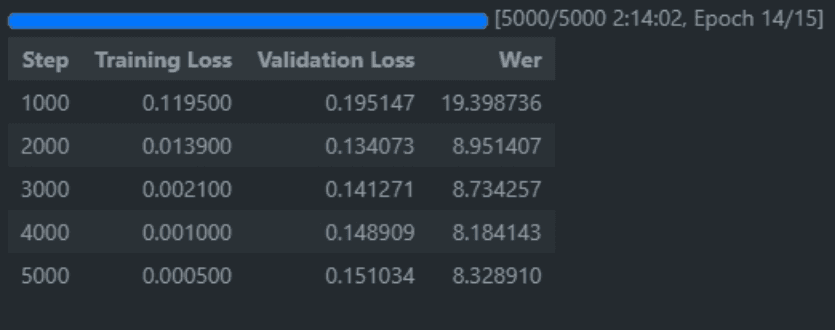
One might be tempted to say that these results speak for themselves, but that would undermine the purpose of this analysis. A Word Error Rate (WER) between 0 and 10 is considered excellent, while 11 to 20 remains within an acceptable range. Based on our loss metric, recognition performance appears to be exceptionally strong. Now, the real utility lies in deployment.
Deployment
There are several approaches to deploying a model for inference. I explored Apache Spark, AWS SageMaker, and a self-hosted solution on a bare-metal Ubuntu server. While cloud services provide robust end-to-end model management, particularly for large-scale deployments, they can introduce unnecessary complexity when the model has already been trained locally. If you already own the hardware, might as well use it!
For instance, while SageMaker supports stacked models via Multi-Model Inference, utilizing this feature requires a significantly larger instance (far exceeding the free tier FYI). In cases where resource constraints are a factor, a self-hosted deployment may offer a more efficient alternative.
FastAPI & Docker
Let's start with setting up our FastAPI service to expose our model. You may choose to use Django or Flask if you're building/hosting something bigger than a simple REST API.
Here is the handler:
import os
from fastapi import FastAPI, File, UploadFile, HTTPException
import app.models.audio2text as audio2text
from pydantic import BaseModel, Field, parse_obj_as
import shutil

UPLOADS_DIR = os.path.abspath('app/uploads')


app = FastAPI()

def health_check():
    return {"health_check": "OK"}

def translate_demo():
    demo_path = os.path.abspath('app/demo.wav')
    eg_transcriptions, en_translation = audio2text.process(demo_path)
    return {"arabic": eg_transcriptions, "english": en_translation }

def translate_text(arabic_text: str):
    translation = audio2text.translate(arabic_text)
    return {"arabic": arabic_text, "english": translation }

def translate_audio_upload(audio_file: UploadFile = File(...)):
    write_file_path = UPLOADS_DIR+'/'+audio_file.filename.replace(' ', '-')
    try:
        with open(write_file_path, 'wb+') as f:
            shutil.copyfileobj(audio_file.file, f)
    except Exception:
        raise HTTPException(status_code=500, detail='Something went wrong uploading the file')
    finally:
        audio_file.file.close()

    eg_transcriptions, en_translation = audio2text.process(write_file_path)
    os.remove(write_file_path)
    return {"arabic": eg_transcriptions, "english": en_translation }


# API ROUTES
@app.get("/")
def health_check_api():
    return health_check()

@app.get("/translate-demo")
def translate_demo_api():
    return translate_demo()

@app.get("/translate-text")
def translate_text_api(arabic_text: str):
    return translate_text(arabic_text)

@app.post("/translate-audio")
def translate_audio_upload_api(audio_file: UploadFile = File(...)):
    return translate_audio_upload(audio_file)
...and the huggingface loaders and pipelines...
from transformers import pipeline, AutoTokenizer, AutoModelForCausalLM, WhisperForConditionalGeneration, WhisperProcessor, WhisperTokenizer
import torch

import sys
from os import path
from pathlib import Path
import os

os.environ["CUDA_VISIBLE_DEVICES"]=""
device = torch.device('cpu')
print("Cuda availability: ", torch.cuda.is_available())

ARTIFACTS_DIR = Path('artifacts').resolve()


# Pipes
recognition_pipe = pipeline(model="alexstokes/whisper-small-eg2",
    torch_dtype=torch.bfloat16,
    device_map="auto")
translation_pipe = pipeline(task="translation",
                      model="facebook/nllb-200-3.3B",
                      torch_dtype=torch.bfloat16)


def transcribe(audio_path: Path):
    audio_path = str(audio_path)
    text = recognition_pipe(audio_path)["text"]
    return text

def translate(eg_text:str):
    en_text = translation_pipe(eg_text,
               do_sample=True,
               temperature=0.7,
               top_p=0.5,
               src_lang="arz_Arab",
               tgt_lang="eng_Latn",
               max_length=512)
    return en_text


def process(audio_path):
    eg_transcriptions = transcribe(audio_path)
    en_text = translate(eg_transcriptions)
    print("Translation:", en_text)
    return eg_transcriptions, en_text

if __name__=="__main__":
    if len(sys.argv) > 0:
        process(sys.argv[1])
    else:
        print("Please provide path to audio to transcribe and translate.")
I found that for my hardware, using torch dtype of binary float 16 had a significant positive impact on performance while not negatively impacting response quality.
If you have any trouble setting this up, you can leave a comment here, email me, or open an issue thread on the Github repo.
Questions or Feedback?
Reach out through the contact form on the home page, email me, or open an issue on the project repo if you want help reproducing the setup.